Secrets of Digital Photography
Nikon D70 Addenda 12 22 04
December, 2004
PricesD70 prices continue to hold steady. It's rare to see them discounted more than $100 plus rebates. Be aware that several Internet outlets will promise a lot while delivering a little. Buy from Internet outlets only AFTER making voice to voice contact. For a lesson in the meaning of sleeze--or not--put the questions to a live human and listen carefully for the telltale signs of deception. Women detect this better than guys, so if you are a guy, get your lady friend to make the call.
The most common tactic: tell you that it is in stock, not gray market and doesn't include a battery charger or some essential component that ALWAYS is included with the USA product. Call their bluff. How much for overnight delivery? How is it that you guys can sell a product without the things that Nikon USA ALWAYS includes in the box?
Non-BS Internet outlets include: Adorama, B&H Photo Video, PC Connection, Dell and many more.
I personally am avoiding Royal Camera, having had outrageous prevarications imparted from their mouth to my ear. Buyer: Be Aware.
On a more positive note, Nikon's own $100 rebate on camera body is nice. Just in time for the Holidays, too, and from the look of their Rhinoceros ad, use the savings for a nice, fast CF card.
Bugs
We don't need bugs, but they happen. Here are two from the D70 Errata page:
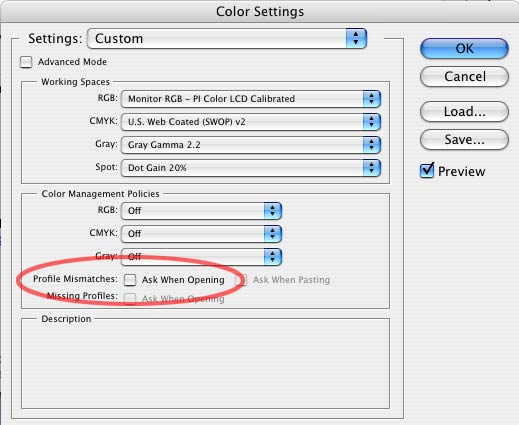
5. Here's a novel "bug" of sorts. If your Photoshop Color Settings window has a certain box checked, it will cause the program to jam with certain Actions which create a new window as part of their process. The circled area in this image identifies the box that should be unchecked as it is here:
You don't want Photoshop to identify Profile Mismatches and "Ask When Opening" when you run iNovaFX Photoshop Actions.
When this box is checked, Photoshop will halt telling you that it doesn't have the profile: "PI Color LCD Calibrated". Well of course it doesn't.
6. In the iNovaFX folder iFXxD70, the iOldTymie action has a bona fide bug. It's an inadvertent command that crept into the string of instructions, and it will only confuse you. View the Action in List Mode (with Button Mode unchecked in the Actions Palette options that open using the upper right reveal-delta) and open up the list for iOldTymie. Note the spurious command in the image below.
The fix is easy. Just uncheck the box to the left of that "Select snapshot PanoKitRight-03.jpg" item, or toss that instruction into the nearby trash. If this is unhandy for you contact me peter.inova@mac.com with iOldTymie as the Subject line and I'll send you a fixed version by return email.
This is what it looks like when the Actions Palette is opened up large:
That's the offending item outlined in red.
Get the eBook. Nikon and Sony versions available now. We have a secure order page that will allow previous Nikon eBook owners to upgrade for low cost, too.
Or you can call direct and order from the publisher by phone or FAX.
Phone:(310) 475 2988 (M-F 9-5 Pacific Time)
FAX (310) 475 9486 (24hrs).
© 2004 Peter iNova. All rights reserved. Do not reprint. Simply add a link to this page.